n8n vs Zapier: Which Should a Small Business Use?
n8n vs Zapier for small service businesses: how each one prices, what it takes to run, and which fits a clinic, law firm or home-service company.

If you run a small service business, you have probably heard both names: Zapier and n8n. Both connect the apps you already use so routine work happens on its own. They charge in very different ways, though, and they ask different things of your team. This guide compares n8n vs Zapier for clinics, law firms, home-service companies and agencies, using each company's own pricing pages and documentation.
What is the difference between n8n and Zapier?
Zapier is a fully hosted, no-code automation tool that connects thousands of apps and charges for each completed action. n8n is a workflow automation tool you can use in n8n's cloud or run on your own server, and it charges for each full workflow run instead of each step.
Both cover the tools most small businesses rely on: CRMs, calendars, email, forms and spreadsheets. Zapier says it connects 9,000+ apps, while n8n's integrations page lists more than 2,300. For a typical service business, either list will include the CRM, calendar and inbox you use today.
How does n8n pricing compare with Zapier pricing?
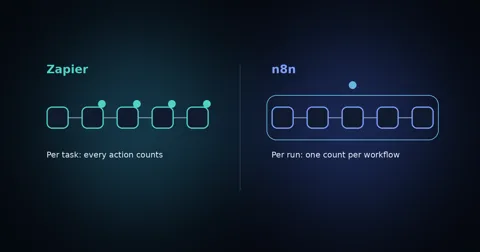
Zapier counts every successful action in a workflow as a task, while n8n counts one execution for each complete run, no matter how many steps it has. The more steps your workflows have, the more that difference matters.
Zapier's pricing page puts it plainly: "Each successful action in a Zap counts as a separate task," and triggers don't count. The free plan includes 100 tasks a month and two-step Zaps only, and the Professional plan starts from $19.99 a month. n8n's pricing page says "An execution is a single run of your entire workflow," priced "regardless of complexity." Its cloud Starter plan is €20 a month billed annually with 2,500 executions, and Pro is €50 a month billed annually with 10,000.
Here is what that means in practice. Picture a lead follow-up workflow with five actions: add the lead to your CRM, send a text, send an email, alert your team and create a follow-up task. If 300 leads come in a month, that is 1,500 tasks on Zapier and 300 executions on n8n.
Prices were checked on October 10, 2026. Both companies change their plans, so check the two pricing pages before you decide.
| Zapier | n8n | |
|---|---|---|
| What you pay for | Tasks: each successful action | Executions: each full workflow run |
| Free option | 100 tasks a month, two-step Zaps | Self-hosted Community edition |
| Hosting | Hosted by Zapier only | n8n cloud or your own server |
| Apps listed | 9,000+ | More than 2,300 |
| Best fit | Simple automations, no one to maintain them | Multi-step, high-volume or sensitive workflows |
Can you self-host n8n for free?
Yes. n8n's hosting documentation says that "without a license key, n8n runs as the free Community edition," which you install on a server you control.
Free means no license fee, not no cost. You still pay for the server, and someone has to install it, keep it updated, back it up and keep it secure. For a business with no technical person on staff, that upkeep is the real price of self-hosting.
Which is easier for a non-technical team?
Zapier is usually the easier place to start, because there is nothing to host and simple two-step automations can be built from templates without technical help. n8n gives you more control over logic and data, and it rewards some comfort with concepts like webhooks and API requests.
A useful test: if the person who will build and fix your automations has never read an API's documentation, start with Zapier. If they have, or you have help, n8n's flexibility starts to pay off.
Which should a clinic, law firm or home-service business choose?
Choose Zapier if you want a handful of simple automations running soon and no one to look after them. Choose n8n if your workflows have many steps, run at high volume, or handle client data you would rather keep on your own server.
- A small home-service company that wants new web form leads copied into a spreadsheet and a text sent to the owner can do that in Zapier with little setup.
- A clinic or law firm moving client or patient details between systems may prefer self-hosted n8n, since the data passes through a server the business controls. Check your own privacy and compliance obligations either way.
- An agency running long, multi-step workflows for several clients will usually find n8n's per-run pricing easier to predict as volume grows.
What do both tools leave to you?
Neither tool decides what is worth automating, writes the messages your customers receive, or plans what happens when a step fails. That design and testing work is where most automations succeed or fail.
Before you build, write down what the automation should do, what it should never do, and when a person takes over. Set up an alert for failed runs, and name the person who owns each workflow. Our guide to automating lead follow-up with AI walks through that planning for the most common first workflow.
When should you hire someone instead?
Bring in help when an automation talks to your customers directly, such as calls, texts or bookings, or when it has to keep several systems in sync. A mistake there costs you customers, not just time.
That is the work we do at Agentyra as an AI automation agency for small businesses: we design the workflow, build it on the tools that fit, test it against real scenarios and keep it running. If phone calls are the bottleneck, our AI receptionist and voice agents answer and book calls with a human handoff built in. Not sure whether you need Zapier, n8n or neither? A free strategy call will give you an honest answer.