Quote Follow-Up Templates for Contractors: Email and Text Examples
Quote follow-up templates for contractors: copy-ready emails and texts, a two-week schedule, what to say about price, and how to automate it.
 By Saad Ali, founder of Agentyra AI
Most quotes don't get a yes or a no. They get silence. The customer is comparing prices, waiting to talk to a partner, or simply busy, and the contractor who follows up politely and on time is often the one who wins the job. This guide gives you quote follow-up templates for email and text that you can copy, a simple schedule for when to send each one, and tips for automating the whole sequence without sounding like a robot.
Why should you follow up on a quote?
Because a quiet customer is usually undecided, not uninterested. They asked you for a price, which means they have a real job that needs doing. A short, friendly follow-up reminds them who you are, answers the question they didn't ask, and makes it easy to say yes.
Many contractors never follow up at all, because it feels pushy or because the next job takes over. That's an opening for you. A clear follow-up schedule turns quotes you already paid to win, in drive time, site visits and estimating hours, into booked work.
When should you follow up after sending a quote?
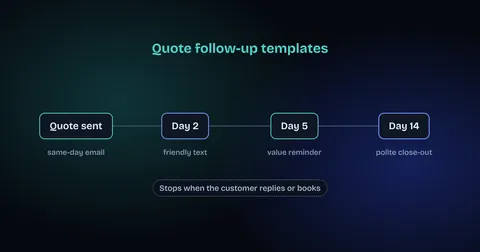
A good default is four touches over about two weeks: a same-day confirmation, a check-in after two days, a value reminder after about five days, and a polite close-out after about two weeks. Adjust it to the job: urgent repairs need faster follow-up, and larger projects can take longer.
| When | Channel | Purpose |
|---|---|---|
| Same day | Email, with the quote attached | Confirm it arrived and offer to answer questions |
| Day 2 | Text | A short, friendly check-in |
| Day 5 | Email or call | Answer common objections and remind them what's included |
| Day 14 | Email or text | A polite close-out that invites a reply |
Stop the sequence as soon as the customer replies, books or says no. If you want the reasoning behind this kind of schedule, our guide on how to follow up with leads that don't respond explains how many touches to send and when to stop.
Template 1: Same-day quote confirmation (email)
Send this with the quote, or within a few hours of the site visit. Its job is to confirm the details and make questions easy.
Subject: Your quote for [job] at [address]
Hi [First name],
Thanks for having us out today. Your quote for [job] is attached. It includes [two or three key items, such as materials, labor and cleanup].
If anything is unclear or you'd like to change the scope, just reply to this email or call me on [phone]. We can usually start within [timeframe] of your go-ahead.
Thanks,
[Your name], [Business name]
Template 2: Day 2 check-in (text)
Keep texts short and personal. Use the customer's name and mention the job so they know exactly who is writing.
Hi [First name], it's [Your name] from [Business name]. Just checking you got the quote for [job]. Happy to answer any questions or walk you through it on a quick call.
Template 3: Day 5 value reminder (email)
By day five, the customer may be comparing quotes. Don't lower your price unprompted. Instead, answer the questions people usually have and remind them what they're getting.
Subject: A few common questions about your [job] quote
Hi [First name],
When people compare quotes for [job], they usually ask us about three things:
- What's included: [materials, permits, cleanup, disposal].
- The warranty: [your warranty in one line].
- Timing: [when you can start and roughly how long the job takes].
If another quote looks different, I'm happy to go through it with you line by line so you're comparing like with like.
Thanks,
[Your name]
Template 4: Day 14 close-out (email or text)
The close-out is often the message that gets a reply, because it gives the customer an easy way to answer, even if the answer is no.
Hi [First name], I haven't heard back about the [job] quote, so I'll assume the timing isn't right and close it on our side for now. If you'd still like to go ahead, or want to adjust the scope, just reply and I'll pick it up straight away. Thanks for considering us.
What should you say when a customer says it's too expensive?
Thank them for the honest answer, then ask what the price is being compared with. Often the other quote leaves something out, such as permits, disposal or a warranty. If yours is genuinely higher, explain why in one or two sentences, or offer a smaller first phase rather than cutting your rate.
Thanks for letting me know, [First name]. Can I ask what you're comparing it with? Sometimes quotes leave out [permits, disposal, warranty], so I'm happy to check you're comparing like with like. If budget is the main issue, we could also start with [smaller first phase] and do the rest later.
How do you automate quote follow-up?
Most job management tools and CRMs can send scheduled emails and texts after a quote goes out. If yours can't, a workflow tool such as n8n or Make.com can watch for new quotes and send each template on schedule. Whichever you use, the sequence should stop automatically when the customer replies or books.
- Trigger: the quote is sent or marked as "sent" in your system.
- Personalize: pull the customer's first name, the job and the address into each message.
- Stop rules: any reply, a booking, a "no", or an opt-out ends the sequence.
- Hand off: replies go to a person, not to another automated message.
Messaging and email rules differ by country, so check the ones that apply to you, and always stop contacting anyone who asks you to. Our n8n and Make.com automation page explains how we build sequences like this for service businesses.
Where should a person stay in charge?
Automation can send reminders on time. A person should handle price negotiations, scope changes, complaints and anything that needs a site revisit. When a customer replies with a question, the fastest human answer usually wins the job.
Calls matter too: a customer ready to book often phones rather than emails. If you're a plumber, see how our AI answering service for plumbers picks up those calls when you're on a job.
How do you measure quote follow-up?
Track three numbers each month: quotes sent, quotes accepted, and the average number of days from quote to yes. Compare them before and after you start a follow-up schedule.
- Close rate: quotes accepted divided by quotes sent.
- Time to decision: days from sending the quote to a yes or no.
- Which touch converts: note which message the customer replied to, and tune the others.
Want this set up for you?
We build lead capture and follow-up automations for contractors and other service businesses, with every reply routed to a person. Book a free strategy call and we'll map your quote process with you.