How to Follow Up With Leads That Don't Respond: A Service Business Guide
How to follow up with leads that don't respond: why leads go quiet, how many times to follow up, what to say, when to stop, and how to automate it.
 By Saad Ali, founder of Agentyra AI
Every service business knows the feeling. Someone fills in your form or leaves a voicemail, you call back, and nothing. No answer, no reply to your text, no response to your quote. It is tempting to assume they weren't serious. Usually they were, and they just got busy, got distracted or got a faster reply from someone else. This guide covers how to follow up with leads that don't respond: why they go quiet, how many times to try, what to say at each step, when to stop, and which parts you can safely automate.
Why do leads stop responding?
Most leads go quiet for ordinary reasons, not because they lost interest. They are at work when you call, they forgot they asked, they are still comparing quotes, or the problem became less urgent once the first panic passed. Silence usually means "not right now," not "no."
The bigger risk is timing. A Harvard Business Review study of online sales leads found that companies that tried to contact a lead within an hour were nearly seven times as likely to qualify that lead as those that waited even an hour longer. The longer the gap, the more likely the lead has moved on.
Calls work the same way. CallRail's 2025 small business benchmark found that up to 85% of customers whose calls go unanswered won't call back. So the first job is to reply fast, and the second is to keep trying politely when they don't reply.
How many times should you follow up with a lead?
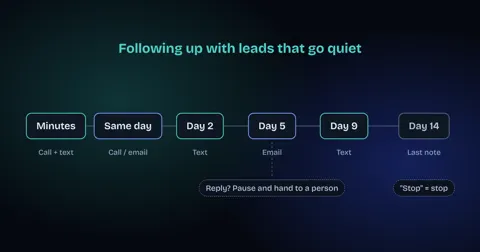
For most service businesses, five or six touches over about two weeks is a sensible default, spread across phone, text and email. That is enough to reach people who are busy without becoming a nuisance.
Most small businesses stop far too early, often after one call that went to voicemail. A simple, written schedule fixes that, because nobody has to remember who to chase or decide when to give up.
| When | Channel | Goal |
|---|---|---|
| Within minutes | Call, then text if no answer | Reply while they are still thinking about it |
| Same day, a few hours later | Second call or short email | Catch them after work or between jobs |
| Day 2 | Text | Make replying easy with one simple question |
| Day 4 or 5 | Email or call | Add something useful: a price range, photos of similar work, available times |
| Day 8 to 10 | Text | Check whether the need has changed |
| Day 14 | A polite last message that leaves the door open |
Adjust the pace to the job. An emergency repair needs the first three touches within hours. A remodel or a legal matter can run on a slower, longer schedule.
What should you say when a lead doesn't reply?
Keep each message short, specific to what they asked about, and easy to answer. Never guilt the lead or repeat the same "just checking in" line. Each touch should give them a reason to reply.
A few examples you can adapt:
- First text after a missed call: "Hi [name], it's [your name] from [business]. Sorry we missed you about the leaking water heater. Is now a good time to call, or would you rather text?"
- Day 2: "Hi [name], quick question so we can help: is the water heater still leaking, or has it stopped for now?"
- Day 4 or 5: "We have openings Thursday morning or Friday afternoon. Want me to hold one for you?"
- Day 8 to 10: "Just checking whether you still need help with the water heater, or if it's been sorted. Either answer is fine."
- Last message: "I won't keep messaging you about this. If you need us later, just reply here or call this number and we'll pick it up."
Use the customer's name, the job they asked about and a real next step. A question with a one-word answer ("still leaking?") gets far more replies than an open-ended "let me know."
Which channel works best: calls, texts or emails?
Use all three, in the order the lead is most likely to see them. Call first for urgent jobs, text when a call goes unanswered, and use email for anything longer, such as a quote or photos.
Texts are usually the easiest to reply to between other tasks, so they work well for short questions. Emails suit detail and documents. Calls are best for urgent problems and for leads who have already shown strong interest. Whatever you choose, keep every touch in one place, such as your CRM or job system, so anyone on your team can see the full history.
When should you stop following up?
Stop when the lead says no, asks you to stop, or hasn't replied after your last scheduled message. Then send a short closing note and move them to a slower list, such as a seasonal check-in, rather than deleting them.
If someone replies "stop," stop straight away on that channel. Messaging rules differ by country, so check the ones that apply to you. For example, under Federal Communications Commission rules that took effect in April 2025, people can opt out of automated calls and texts by any reasonable means, such as replying "stop," "quit" or "cancel," and businesses must honor the request within 10 business days, according to employment law firm Fisher Phillips. This is general information, not legal advice.
Where should a person stay in charge?
Automation should handle the schedule and the routine messages. A person should handle anything that needs judgment: a price change, an upset customer, a complaint about a past job, or a lead who asks a detailed question.
Write these handoff rules down before you automate anything. For example: if a lead replies with a question, stop the sequence and alert the office. If a lead mentions a problem with earlier work, route it straight to the owner. The goal is that no real conversation is ever answered by a template.
How to automate follow-up for leads that don't respond
You can automate the whole schedule above with tools you may already have. The steps are the same whether you use your CRM's built-in sequences, a workflow tool like n8n or Make.com, or an AI agent.
- Capture every lead in one place. Forms, missed calls, chats and emails should all land in the same list, with the time they came in.
- Send the first reply automatically. A text or email within minutes, confirming you got the request and offering a next step.
- Load the follow-up schedule. Set the timing and messages from your table, with the customer's name and job filled in.
- Stop the moment they reply. Any reply should pause the sequence and alert a person.
- Handle opt-outs instantly. A "stop" reply should remove them from all automated messages.
- Review weekly. Read a sample of conversations and adjust any message that gets no replies.
Our guide to how to automate lead follow-up with AI goes deeper on the setup, and our n8n and Make.com automation page explains how we build these workflows for clients. If most of your missed leads are phone calls, an AI call agent can answer them before they ever go quiet.
How do you measure follow-up results?
Track four numbers before and after you change your process: how fast you first reply, what share of leads ever reply, what share book a job, and how many leads get no follow-up at all.
- Time to first reply: from the moment the lead arrives to your first call or message.
- Reply rate: the share of leads who answer at any point in the sequence.
- Booking rate: the share of leads who become a booked job or appointment.
- Dropped leads: leads with no follow-up recorded. The goal is zero.
Check which step in your schedule gets the most replies. That tells you which message to improve first.
Want this done for you?
We build follow-up systems for service businesses: instant first replies, a polite multi-step schedule, opt-out handling and a clear handoff to your team. Book a free strategy call and we will look at where your leads are going quiet and what to fix first.