What Is an AI Agent? A Plain-English Guide for Small Businesses
What an AI agent is, how it works, how it differs from a chatbot or Zapier, what it can do for a small business, and when it is worth it.

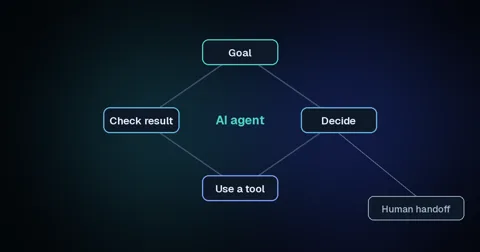
An AI agent is software that is given a goal and works out the steps to reach it on its own: it reads the situation, decides what to do next, uses tools like your calendar or CRM, and checks the result. If you have heard the term everywhere and are still not sure what an AI agent is, this guide explains it in plain English, shows how it differs from a chatbot and from tools like Zapier, and helps you decide whether your business needs one.
What is an AI agent?
An AI agent is a system that uses an AI model to complete a task for you, choosing its own steps and using software tools along the way. The key difference from ordinary AI is that it acts: it does not just answer a question, it gets something done.
The companies building these systems describe it the same way. OpenAI's practical guide to building agents puts it in one line: "Agents are systems that independently accomplish tasks on your behalf." AWS adds the human side: "Humans set goals, but an AI agent independently chooses the best actions it needs to perform to achieve those goals."
How does an AI agent work?
An AI agent works in a loop: it takes a goal, decides on the next step, uses a tool to carry it out, checks what happened and repeats until the job is done or it needs a person. The AI model does the deciding, and the tools do the work.
Picture a new enquiry arriving on your website at 9pm. An agent built for lead follow-up might read the message, look up whether the person is already in your CRM, reply with two open appointment times from your calendar, book the one they choose, and post a note for your team. Each of those steps uses a tool the agent has been given access to, and nothing outside that list.
That last part matters. An agent can only touch the systems you connect it to, and only in the ways you allow, so most of the work in building one is deciding what it may do on its own and what it must hand to a person.
What is the difference between an AI agent and a chatbot?
A chatbot answers questions inside a conversation, while an AI agent can take actions in your other systems to finish a task. Many chatbots are not agents at all, because they cannot book, update or send anything.
IBM's explainer on AI agents draws the line clearly: "Nonagentic AI chatbots are ones without available tools, memory or reasoning." OpenAI's guide makes the same point, saying that simple chatbots and other apps that use AI without letting it control the workflow do not count as agents. The table below compares the three things people most often mix up.
| Chatbot | Rule-based automation | AI agent | |
|---|---|---|---|
| What it does | Answers questions in a chat | Runs the same fixed steps every time | Decides its own steps to reach a goal |
| Takes actions in other tools | Usually not | Yes, exactly as programmed | Yes, choosing which ones to use |
| Handles messy, unexpected input | Partly | Poorly; it breaks or skips | Well, within its guardrails |
| Example | FAQ widget on a website | "New form entry → add row to sheet" | Reads an enquiry, qualifies it, books a call |
| Best for | Common questions | Simple, predictable tasks | Tasks that need judgment |
How is an AI agent different from tools like Zapier or n8n?
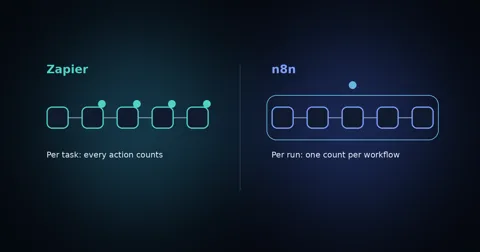
Zapier and n8n run workflows you design step by step, while an AI agent decides some of those steps itself. In practice the two are often combined: the workflow tool connects your apps, and the agent makes the decisions in the middle.
Anthropic's guide to building effective agents uses this exact split. Workflows "are systems where LLMs and tools are orchestrated through predefined code paths," while agents "dynamically direct their own processes and tool usage." If you are choosing a workflow tool to build on, our n8n vs Zapier comparison covers how each one prices and what it takes to run.
What can an AI agent do for a small business?
For a small business, AI agents are most useful on repetitive jobs that still need a bit of judgment: answering calls, following up new leads, handling routine support questions and moving information between tools. They work best when each agent has one clear job.
- Answering and booking calls. An AI receptionist answers the phone, handles common questions, books appointments and transfers anything unusual to a person. Our guide to launching an AI call agent walks through what to automate first.
- Following up new leads. An agent replies to new enquiries within moments, asks a few qualifying questions and books the good ones onto your calendar. See how to automate lead follow-up with AI.
- Routine customer support. An agent answers order, booking and policy questions by chat or email from your own information, and escalates the rest.
- Admin between your tools. An agent reads incoming emails or forms, pulls out the details and updates your CRM, spreadsheet or job system, so nobody retypes the same data.
When is an AI agent worth it, and when is it not?
An AI agent is worth it when a task needs judgment, involves messy information like emails or phone calls, and happens often enough to eat real hours. If the task follows the same steps every time, a simple automation is cheaper and more reliable.
OpenAI's guide suggests agents for work that involves "complex decision-making," "difficult-to-maintain rules" or "heavy reliance on unstructured data," and notes that a simpler, fixed solution may be enough otherwise. Anthropic gives the same advice: "we recommend finding the simplest solution possible, and only increasing complexity when needed."
Be wary of anything sold as an agent just because it uses AI. Gartner predicts that over 40% of agentic AI projects will be canceled by the end of 2027, citing "escalating costs, unclear business value or inadequate risk controls," and warns of "agent washing," the rebranding of existing chatbots and automation tools as agents. Start from a specific job and a clear result, not from the technology.
How do you keep an AI agent safe and accurate?
You keep an AI agent safe by limiting what it can do, testing it on real scenarios before launch, and giving it a clear way to hand off to a person. The goal is an agent that knows its limits, not one that tries everything.
Both OpenAI and Anthropic stress this. Anthropic notes that "the autonomous nature of agents means higher costs, and the potential for compounding errors," and recommends "extensive testing in sandboxed environments, along with the appropriate guardrails." OpenAI's guide says that a human intervention mechanism "allows the agent to gracefully transfer control when it can't complete a task," especially after repeated failures or before high-risk actions such as refunds or payments.
For a small business, that translates into a short checklist:
- Give each agent one job and write down what it must never do.
- Connect only the tools that job needs.
- Test it against real examples from your inbox or call log before it talks to customers.
- Decide exactly when it hands over to a person, and who that person is.
- Review its conversations every week for the first month and adjust.
How do you get started with an AI agent?
Start with one job that costs you customers or hours every week, such as missed calls or slow replies to new enquiries, and build a single agent for it. Measure the result for a month before adding a second.
That is the work we do at Agentyra as an AI automation agency for small businesses: we pick the highest-value first job, design the agent and its guardrails, connect it to the tools you already use and keep it running. If phone calls are where you lose business, our AI receptionist and voice agents answer and book calls with a human handoff built in. Not sure an agent is the right fit? A free strategy call will give you an honest answer.