AI for Small Business: What It Does, Which Tools to Use and How to Start
A plain-English guide to AI for small business: what AI can do, which AI tools for small business are worth it, and how to use AI in your business.
 By Saad Ali, founder of Agentyra AI
AI for small business means using AI tools to take over the repetitive work that eats an owner's week: answering the same questions, following up leads, booking appointments, writing first drafts and moving information between apps. This guide explains what AI can realistically do for a small business, which AI tools for small business are worth looking at, and how to use AI in your business step by step, starting with one job rather than a big project.
Most small businesses have already tried it. In a Goldman Sachs 10,000 Small Businesses Voices survey of 1,256 owners, published in March 2026, 76% said they are currently using AI, but only 14% are fully integrating it into their core operations. The gap between trying AI and getting real work out of it is what this guide is about.
What does AI for small business actually mean?
For a small business, AI means software that understands normal language, so it can read messages, hold conversations and make simple decisions that used to need a person. It is not one product. It is a set of tools, from a chat assistant you type into to an agent that answers your phone.
It helps to think in three levels:
- Assistants help you do a task faster: drafting an email, summarizing a document, brainstorming a social post. You stay in the loop for every step.
- Automations run the same steps every time something happens, such as copying a new form submission into your CRM. Adding AI lets them handle messy input, like a free-text inquiry.
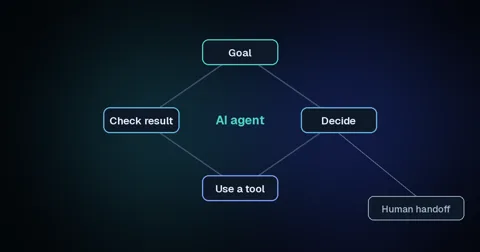
- AI agents are given a goal and work out the steps themselves, using your calendar, CRM or phone system. Our guide to what an AI agent is explains the difference in detail.
Most small businesses start with assistants, and get the biggest gains when they move one important job up to an automation or an agent.
What can AI do for a small business?
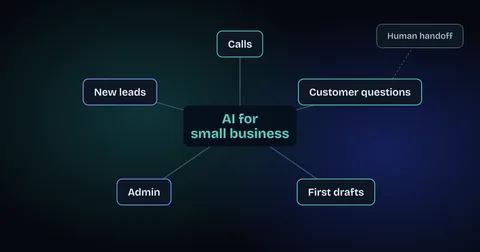
AI is most useful for small businesses on work that is repetitive, time-sensitive or done after hours: answering calls and messages, following up leads, answering routine customer questions, handling admin and producing first drafts of marketing.
The OECD's survey of over 5,000 small and medium-sized businesses in seven countries found generative AI in use in 31% of them, and that firms report it "improves performance, helps compensate for skill gaps and labour shortages." In practice, the jobs where it pays off fastest are these:
- Answering the phone. An AI receptionist or call agent picks up when your team can't, books the appointment and hands the caller to a person when it should.
- Following up new leads. Automated lead follow-up replies to a web inquiry in seconds, asks your qualifying questions and offers times from your calendar.
- Customer questions. AI customer service agents answer the routine chat and email questions from your own policies and pass the rest to your team with the conversation attached.
- Admin between your tools. Data entry, invoicing reminders, weekly reports and handoffs between apps can run as automated workflows.
- First drafts. Emails, social posts, job ads and proposals get written faster when AI produces the first version and a person edits it.
Where should you look first? Before we built Agentyra, we read 1,171 customer reviews of home-service businesses. The complaint was rarely the work. It was silence: the call nobody answered, the callback that never came. For many small businesses, the first AI job worth doing is making sure no customer waits.
What AI tools can a small business use?
The AI tools for small business fall into a handful of types: general AI assistants, AI features inside software you already use, meeting and note tools, AI receptionists, lead follow-up and support agents, and workflow automation platforms. Pick by the job you need done, not by the brand.
| Tool type | What it does | A good first use | Watch out for |
|---|---|---|---|
| General AI assistant (chat) | Drafts, summarizes, answers questions, brainstorms | First drafts of emails, posts and proposals | Checking facts; never paste customer data into a tool your plan doesn't protect |
| AI built into tools you already use | AI features inside your email, documents, CRM or accounting software | Summaries and drafts right where you work | Paying for add-ons you never switch on |
| Meeting and note tools | Record, transcribe and summarize calls and meetings | Client meeting notes and action items | Telling people they are being recorded |
| AI receptionist or call agent | Answers calls, books appointments, routes callers | After-hours and overflow calls | A clear handoff to a person for upset or urgent callers |
| Lead follow-up and support agents | Reply to inquiries and routine questions on web, SMS and email | Replying to every web inquiry within minutes | Answers that go beyond your own information |
| Workflow automation platforms | Connect your apps and move data between them | New form entry to CRM to team notification | Workflows nobody owns or checks when they break |
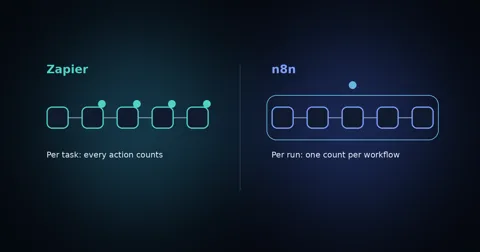
On workflow platforms, the two names most small businesses compare are Zapier and n8n. Our n8n vs Zapier comparison explains how each prices and which suits a small team.
What are the best AI tools for small business? The ones that fix a problem you can name and measure. A tool that saves you five hours a week on admin beats a more impressive one you open twice a month.
How do you use AI in your business, step by step?
To use AI in your business, start with one repetitive job, decide exactly what the AI may do on its own, test it on real examples, measure the result, and only then expand. Small, measured steps beat a big rollout.
- List a week of repetitive work. Write down every task you or your team did more than three times: calls, replies, quotes, data entry, scheduling.
- Score each task. Rate it on hours spent per week and on what it costs when it is slow or missed, such as a lost customer. The task that scores high on both goes first.
- Pick one job. One. Missed calls or slow replies to new inquiries are the most common winners for service businesses.
- Write the rules before you buy anything. What the AI may do alone, what it must never do, and when it hands over to a person.
- Start with the tools you already pay for. Check whether your current CRM, email or booking software already has the AI feature you need.
- Test with real examples. Run it on last month's actual inquiries or calls, not made-up ones, and fix what it gets wrong.
- Measure for a month. Hours saved, response time, calls answered, appointments booked. Compare against the week you listed in step 1.
- Then expand. Move to the next task on your list, one at a time.
This is also how to implement AI in a business without disrupting the team: nobody's whole job changes at once, and everyone can see what the AI does before it does more.
How much does AI cost for a small business?
It ranges from free to a custom project. General AI assistants and the AI features inside common business software often have free tiers or low monthly plans, while agents that answer your phone or connect several systems are usually scoped and priced per project.
Prices change quickly, so compare current plans rather than trusting old lists, and budget for the time to set things up and check them. The cheapest option is the one you actually use: a paid tool that runs a real job every day costs less than three free ones nobody opens.
What are the risks of AI for small businesses, and how do you manage them?
The main risks are customer data leaking into tools that don't protect it, wrong answers stated confidently, customers feeling misled, and automations nobody checks. Each one has a simple guardrail.
They are the same worries owners report. Among AI users in the Goldman Sachs survey, 50% named data privacy and security concerns, 49% a lack of technical expertise and 48% difficulty choosing the right AI tools. The OECD found small firms concerned about copyright, legal and regulatory issues.
- Data: use business plans that state your data isn't used for training, and keep sensitive customer details out of general chat tools.
- Accuracy: limit customer-facing AI to answers from your own information, and have it say "let me get someone" instead of guessing.
- Trust: tell customers when they are talking to AI, and always offer a person.
- Ownership: give every automation an owner who checks it weekly, so a broken workflow doesn't fail quietly for a month.
Should you do it yourself or hire an AI agency?
Do it yourself when the job lives inside one tool, like drafting posts or summarizing meetings. Bring in help when AI has to answer your customers, connect several systems or run every day without someone watching it.
The Goldman Sachs survey found 73% of owners say their business would benefit from more access to training and resources to implement and evaluate AI. If you'd rather not build that know-how in-house, an AI automation agency designs, builds and maintains the agents for you. Either way, the same rule applies: one job, clear rules, a human handoff, and measured results before you expand.
Where should a small business start with AI?
Start where slow or missed responses cost you customers today, usually unanswered calls or new inquiries waiting hours for a reply. It is the easiest result to measure and the fastest to pay back.
That is the work we do at Agentyra: we find the highest-value first job, design the agent and its guardrails, connect it to the tools you already use and keep it running. If you're not sure where AI fits in your business, a free strategy call will give you an honest answer, including when AI isn't the right fit yet.